In the past few days Google rolled out a ~4 GB model to anyone running Chrome — though "rolled out" is doing some work in that sentence. It's not proactive. The download is triggered the first time some site's JavaScript asks for a LanguageModel. Once a single tab on a single page does that, the optimization-guide-on-device-model component starts fetching Gemini Nano in the background and parks it in your Chrome profile. The browser doesn't really tell you. The 4 GB just shows up.
And then it's just sitting there. No API key. No network call at inference time. No usage cap, no rate limit, no auth. A real LLM in your browser, callable from any page that wants to ask it something.
This post is what that model actually is, what happens when you try to lean on it for anything serious, and what I built on top of it after one evening of "okay, but how limited is it really?"
Just want to turn it off? Skip straight to Disabling the model — flag toggles, screenshots, and the directory to delete to reclaim the disk.
What it actually is
The Chrome built-in is Gemini Nano — specifically Nano-2, the larger of the two Nano variants. (Nano-1 is around 1.8B parameters; Nano-2 is around 3.25B.) It's one of the smallest models Google productionizes for on-device use. Their open-weight Gemma family has even smaller members, but Nano is the one that actually ships inside the browser.
Architecturally it's a transformer. Functionally, it's about the smallest thing that can credibly call itself a language model and still run on-device on a laptop without setting your battery on fire. Quantization down from full precision is what gets the on-disk weight to ~4 GB.
The JS surface is small enough to learn in five minutes:
// Check whether the model is available on this machine.
const status = await LanguageModel.availability();
// → 'available' | 'downloadable' | 'downloading' | 'unavailable'

// Create a session. Settings (temperature, topK, system prompt) are frozen
// at create time — to change them you destroy and recreate.
const session = await LanguageModel.create({
  expectedInputs:  [{ type: 'text', languages: ['en'] }],
  expectedOutputs: [{ type: 'text', languages: ['en'] }],
  initialPrompts:  [{ role: 'system', content: 'You are concise.' }],
  monitor(m) {
    m.addEventListener('downloadprogress', e => console.log(e.loaded));
  },
});

// Stream a response.
for await (const chunk of session.promptStreaming('write a haiku about Copenhagen')) {
  process.stdout.write(chunk);
}
(Snippet shape and the outputLanguage requirement come from a helpful comment on r/LocalLLM — the official Chrome docs are technically correct but spread the same information across about six pages.)
That's it. Sessions hold context across calls, the model multi-turns happily, there's an inputUsage / inputQuota (called contextUsage / contextWindow in current Chrome stable — the spec keeps renaming this) so you can see how full the window is. The whole context window is 9,216 tokens. Burn through them and the session is done.
There's also a responseConstraint parameter that takes a JSON Schema — Chrome will run constrained decoding, forcing every emitted token to keep the partial output schema-valid. That one little detail turns out to matter a lot. We'll get to it.
It's dumb
You have to be honest about this part.
Try the strawberry test. Ask it how many R's are in "strawberry pie." It will tell you 4, with full confidence, and offer to elaborate. There is one R. Maybe two if we're being generous about "strawberry." Definitely not four. The model has no concept that it's tokenizing — it sees tokens, not letters, and "strawberry" is probably a single token to it. It can't count what it can't see.
It also gets names wrong constantly. Type "Munroe" and it'll round-trip it as "Monroe" half the time. Quantization at this scale just smudges things. If your name doesn't match the most-common spelling in the training distribution, expect to see the most-common spelling back.
The hallucination problem is the worst part. Ask it about Cameron Munroe (with a U, my actual name) and it will confidently tell you I'm an American actress known for "The Vampire Diaries" and "Teen Wolf." I am not, in fact, an American actress. There is no actress by that name. The model just made one up — invented a Wikipedia URL to back it up — and when challenged, doubled down by inventing an IMDB profile. The Wikipedia URL 404s. The IMDB profile doesn't exist. None of this stops the model from being completely sure of itself.
This is what 3B parameters at ~4 GB quantization buys you. It's not the model's fault. It's not Google's fault for shipping it. It's just where the technology is at this scale. You don't replace your Claude or ChatGPT subscription with this. Anyone telling you otherwise is selling something.
It's slow (sometimes)
Cold start is the rough part. First call into a fresh session on my MiniPC takes around 7 seconds before any tokens come back. That's an eternity in 2026 web-time — by the time the first character lands, the user has already started reading your loading spinner.
Once the session is warm, though, it's snappy. A short response on an established session comes back in under 3 seconds, often closer to 1. The bottleneck after warmup isn't the model, it's the prompt size. Feed it 6,000 tokens of context and even a short reply will take its time.
The cold-start cost has a real implication for how you'd build with this: don't create the session lazily on the user's first interaction. Create it when the page loads, before they need it. Even if they never actually prompt, the session is sitting there warm and ready.
Where it might actually shine
After an evening of poking at it, here's where I think this thing has a real seat at the table:
Summarization of content the user is already looking at. The user landed on a long article, your page already has the text. The model condenses it into a few bullet points. Nothing leaves the device, no API costs, no compliance review. The model isn't reasoning about anything novel — it's compressing text the user could have read themselves but didn't want to. That's the kind of task where a small quantized model genuinely earns its keep.
Light annotation of internal data. Imagine an internal ERP — the user pulls up a part record, your app pipes the relevant fields and any free-text notes through the model, and gets back a short "things to be aware of" blurb. The data never leaves the browser. The blurb isn't authoritative; it's a hint. You're not building a fact engine, you're building a tooltip with vibes.
Live language translation in chat / comments. Translation is the kind of thing where small models hold up better than they do at open reasoning, because the constraints are tighter. You're not asking the model to know facts; you're asking it to map between languages.
The pattern in all three: the model is doing transformation work on text the user already has. It's not being asked to know things — it's being asked to rephrase, condense, or translate things. That's the mode where Nano-class models can actually be useful instead of frustrating.
Pushing it too far
Naturally, the moment I had this working, I had to push it well past where it was useful and see what broke. That's how random.clusterlabs.dev/tools/chrome-ai-playground/ came into being. The original goal was small: just wrap the API in a halfway-decent chat UI. A textarea, a stream of tokens coming back, a token-usage pill. An evening of HTML.
That part went fine. The thing turned into a project once I asked the obvious follow-up: can I give it tools?
There's no native function-calling API in Chrome's LanguageModel. No tools: [...] option, no toolUse block in the response. But there's responseConstraint, and that's enough to fake it cleanly. You hand the model a JSON Schema like:
{
  anyOf: [
    {
      type: 'object',
      properties: {
        tool: { type: 'string', enum: ['web_search'] },
        args: { type: 'object', properties: { query: { type: 'string' } }, required: ['query'] }
      },
      required: ['tool', 'args']
    },
    {
      type: 'object',
      properties: { answer: { type: 'string' } },
      required: ['answer']
    }
  ]
}
…and Chrome's constrained decoder forces every output to be either a tool call or an answer. JSON.parse() literally never throws. From there it's just a loop in JavaScript: parse → if tool, dispatch the tool → feed the result back as the next user turn → if answer, render and stop.
That worked surprisingly well, so I kept adding to it.
The tools the agent has now
Five tools. The number was deliberate — Gemini Nano's tool-selection accuracy degrades sharply past about six options, so I held the line.
web_search(query) — fronted by a self-hosted SearXNG instance running in my k3s cluster, exposed through api.clusterlabs.dev/search. Two replicas pinned to nodes that egress through a PIA tunnel — without that, the cluster's static datacenter IP gets rate-limited by Brave, Mojeek, and Qwant within minutes. Results come back as {title, url, snippet, engine} and get truncated and fed back to the model.
web_fetch(url) — POSTs to api.clusterlabs.dev/markdown/convert, which fetches a URL server-side with browser-y headers and returns clean markdown with nav/scripts/ads stripped. The result is truncated to 1,800 characters before being fed back, because at ~4 chars/token that's already 450 tokens out of a 9,216-token budget.
compute(expression) — local-only, evaluates a math expression via Function() with a strict character whitelist. The model is terrible at arithmetic. Asking it for 17% of 234 yields confident lies about 30% of the time. Giving it a calculator means it stops trying to be one.
current_datetime() — local-only, returns the user's local time and IANA timezone. The model's training-time clock drifts hard. Anything involving "today," "now," or "this year" used to come back wrong; now it doesn't.
dns_lookup(hostname, type) — browser-direct against Cloudflare's DoH endpoint at cloudflare-dns.com/dns-query. Supports A, AAAA, MX, TXT, the usual suspects. This one's a bit niche but it's also one of the cheapest tools to add — no backend, just a fetch call.
The icons in the chat — 🔍 for search, 📄 for fetch, 🧮 for compute, 🕒 for datetime, 🌐 for DNS — are there because when the agent loop gets going, you genuinely need to glance at the transcript and tell which side of the loop the model is on.
The hallucination problem (still the hardest part)
Even with grounding tools wired up, the model will hallucinate the moment it has the chance — and most of the engineering effort ended up here.
The original failure pattern was glorious. web_search would come back empty (engines rate-limited, or the topic just didn't exist), so the model would web_fetch a URL it had invented from training data — https://en.wikipedia.org/wiki/Cameron_Munroe (404), https://www.imdb.com/name/nm1722204/ (also fake). The fetch returned a 404 page; the model interpreted "I got HTML back" as "I read the page" and confabulated an entire biography from the failure.
Four guards, in rough order of impact:
- Hard URL allowlist. Track every URL the model has seen in a search result; reject
web_fetchon anything else with an explicit "do not invent URLs" error. Kills the hallucinated-URL pattern at the source. - Consecutive-failure guard. After two empty/failed tool calls in a row, short-circuit the loop and synthesize "I wasn't able to find reliable information for your question." Better to deterministically admit defeat than to give a confidently wrong answer.
- Few-shot examples in the system prompt. ~300 tokens of context, visibly better tool selection — the model imitates in-context patterns much better than it follows abstract rules.
- Explicit anti-hallucination rules. A
CRITICAL RULESblock: "if a search returns 0 results, say so instead of fabricating." Soft guard — Gemini Nano's instruction-following is what it is — but it helps at the margins.
The result: ask the playground about me today and it says "I couldn't find reliable information about Cameron Munroe" instead of inventing a film career. Which is honest, and that's most of what we're after.
Disabling the model
If you'd rather not have an LLM running in your browser at all, fair enough. The model is real disk and real RAM, the API surface is real attack surface, and "the browser silently installed a 4 GB neural network" is a thing your security team might want to opt out of independently of the merits of the technology.
Here's what works as of Chrome 138+:
1. Disable the model component. Open chrome://flags/#optimization-guide-on-device-model and set the dropdown to Disabled. This is the master switch — it stops Chrome from downloading or using the model.
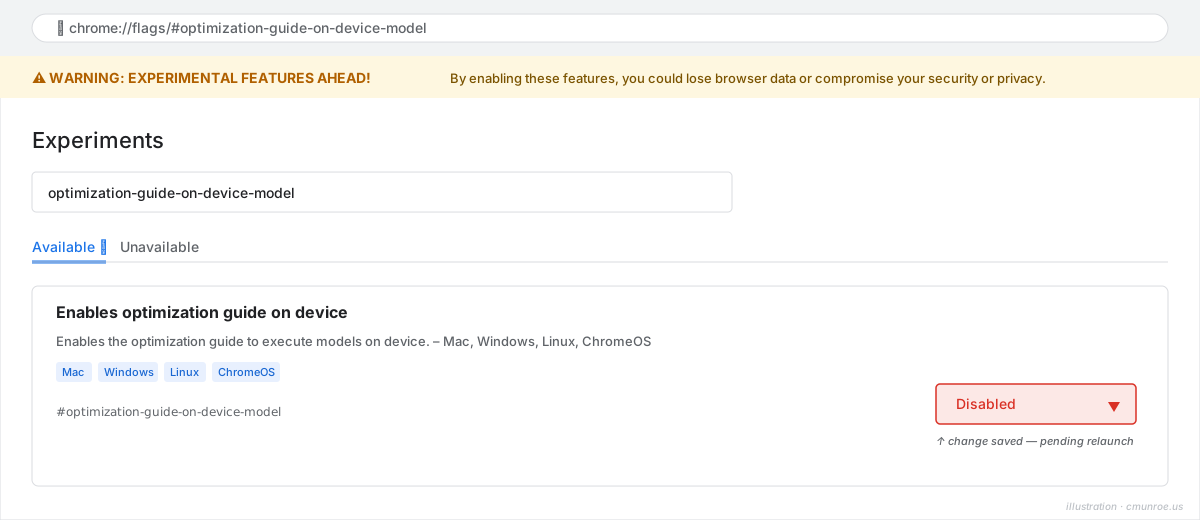
2. Disable the JS API. Open chrome://flags/#prompt-api-for-gemini-nano and set it to Disabled too. This removes the LanguageModel global, so even if weights are on disk, no page can call them.
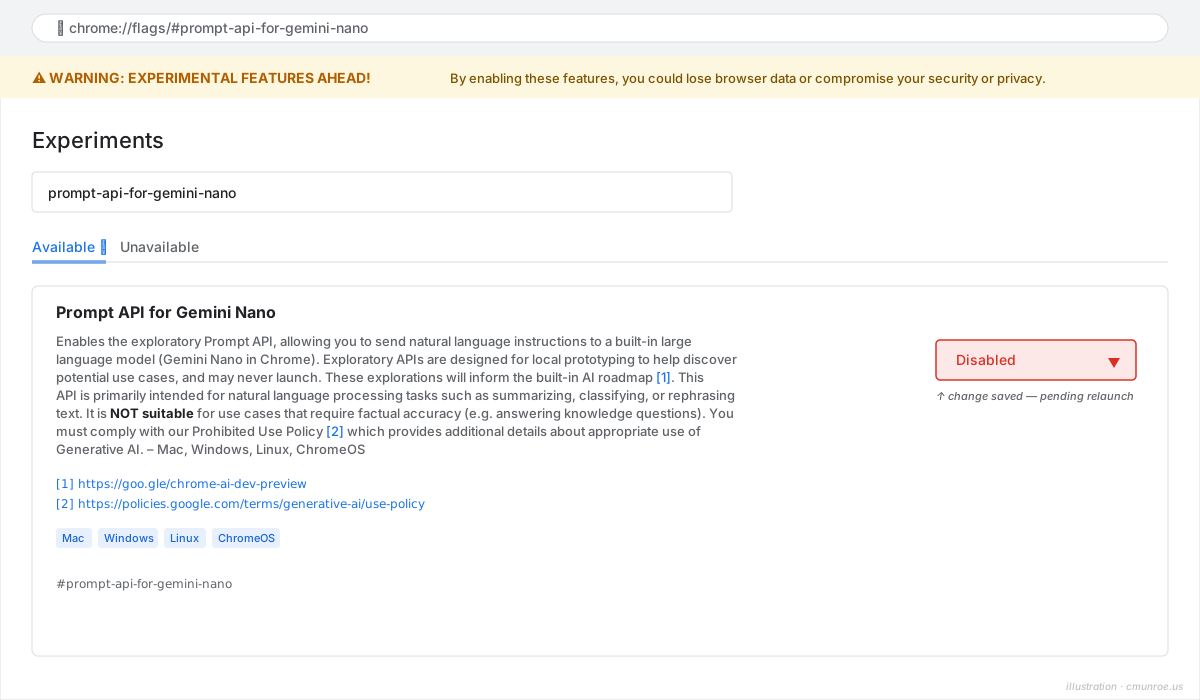
3. Restart Chrome using the Relaunch button that appears at the bottom of the flags page after either toggle.

4. Delete the model directory to reclaim the disk. The directory is called optimization_guide_model_store and lives under your Chrome profile:
- macOS:
~/Library/Application Support/Google/Chrome/optimization_guide_model_store/ - Linux:
~/.config/google-chrome/optimization_guide_model_store/ - Windows:
%LOCALAPPDATA%\Google\Chrome\User Data\optimization_guide_model_store\
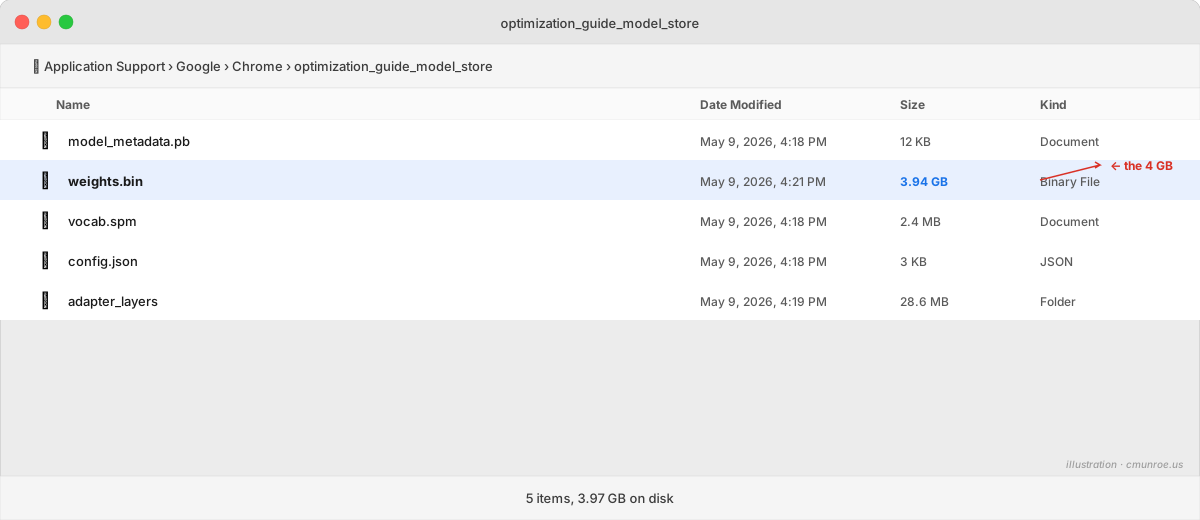
The directory has the weights and a few metadata files. Once the flags are off, Chrome won't re-download it.
A couple of footnotes worth knowing. The flag toggle is per-profile — if you run multiple Chrome profiles, you'll want to do step 2 in each one. The weights themselves live at the user-data level and are shared, so the deletion in step 4 only happens once.
And one last caveat: the on-device model lives inside a broader Chrome subsystem called optimization-guide. Disabling the model component doesn't disable the parent system. If you want to nuke that whole layer too, chrome://flags/#optimization-guide-fetching-debug and friends are where to look — but they affect a lot more than just the LLM, and I wouldn't reach for them without a specific reason.
What the experience left me with
A few things I'm taking away from this:
On-device inference is finally useful for something. Not for the "replace ChatGPT" narrative the marketing wants — for narrower, more honest jobs. Summarize this paragraph. Format these notes. Translate this comment. Rephrase this in a friendlier tone. The task fits the tool. Push past that and the cracks show fast.
The browser is a real LLM platform now. A LanguageModel global. No auth. No setup. No network call at inference time. Callable from any page. The current model isn't the interesting part — the API surface is. Whatever Google ships as a successor (or whatever Apple eventually puts in Safari) can plug into the same JS calls without breaking anything written for it today. This model is the floor, not the ceiling.
Constrained decoding is the multiplier. Without responseConstraint, building any kind of agent loop on a 3B model is a regex-and-prayers exercise. With it, you get reliable structured output and the model's job collapses to "pick the right tool" instead of "pick the right tool and serialize the call correctly." Every model size benefits from this; small models depend on it.
The hard part isn't the model — it's the agent loop. Wrapping a session in a chat UI is half a day of HTML. Building an agent loop that gracefully handles failed tools, hallucinated URLs, empty search results, rate limits, context exhaustion, and a model that will confidently invent your biography on no provocation? That was the actual work, and most of it was infrastructure-shaped — a search backend, a fetch proxy, a network policy fight with Flux, a URL allowlist, a failure-counter guard. The model itself was almost the easy part.
If you want to play with what this thing can actually do (and what it can't), the playground is at random.clusterlabs.dev/tools/chrome-ai-playground/. Open it in desktop Chrome 138+, give it a question, and watch the agent loop in action. Watch it search for something current. Watch it fetch a URL and summarize it. Then ask it about Cameron Munroe and see if my anti-hallucination guards actually held.