#!/bin/coding
Blog PKB Portfolio Places Resume Consulting Contact Donate
Support Referrals Status
Home/Support

⚠ Before you continue

This page sets up remote access so Cameron Munroe can see and control your computer to help you.

Only continue if you personally know Cameron and he asked you directly to set this up.

If a stranger contacted you — by phone, text, email, or a pop-up — and told you to come here or install something, stop now. This is a scam. Hang up, install nothing, and close this page. No real bank, company, or “tech support” will ever ask you to do this.

Not sure? Call Cameron yourself first, using a number you already have for him — not one someone gave you.

This wasn't me — get me out

Remote Support

Need a hand with your computer? Download the installer for your computer below and run it, then give me a quick call — I'll finish a two-minute setup with you, and after that I can connect securely whenever you need help. You don't have to keep anything open.

This is RustDesk — a trusted open-source remote-desktop tool. It's the official, Apple- and Microsoft-signed installer (served straight from my site), set up to connect only to my private server. The screen-sharing connection is end-to-end encrypted, and no one else can use it.

Pick your computer:

Download for Windows Download for Mac

Windows PCs (Dell, HP, Lenovo…) use the first one; Apple computers (MacBook, iMac) use the second. Got an older Intel Mac (pre-2021)? Get the Intel version.

Set it up

  1. Download & install the app above. Windows: run the installer. Mac: open the downloaded file and drag RustDesk into Applications. It's the normal, signed installer — it opens without any scary warnings.
  2. Connect it to my server. First, copy the config:

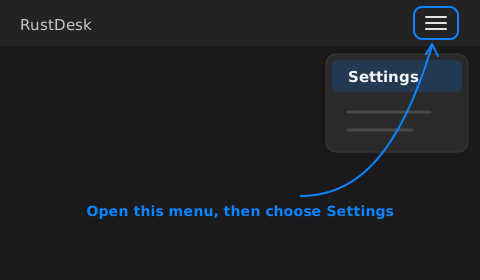
    Then in RustDesk, open the menu (the ☰ button in the top-right) and choose Settings: RustDesk's main window with the top-right menu button highlighted, opening a menu where Settings is selected
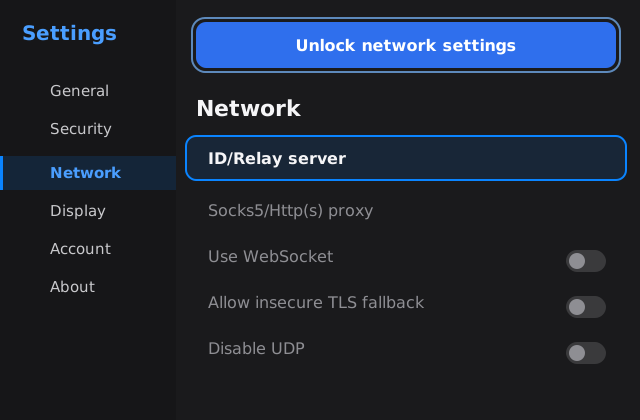
  3. Open the server settings. In Settings, choose Network, click Unlock network settings, then open ID/Relay server: RustDesk Settings on the Network page, with Unlock network settings and the ID/Relay server row highlighted
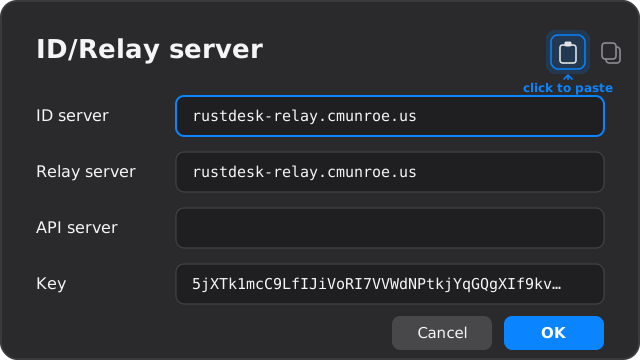
  4. Paste it in. In the box that opens, click the paste icon at the top-right (it fills in the server and key automatically), then click OK: RustDesk's ID/Relay server dialog with the server address and key filled in; the paste-config icon at the top-right is highlighted
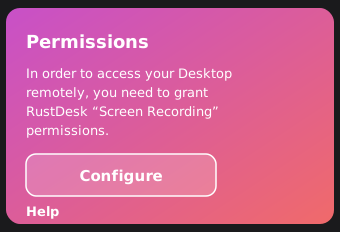
  5. Mac only — allow screen sharing. Back on the main screen, RustDesk shows a pink Permissions box: click Configure and switch RustDesk on for Screen Recording (and Accessibility). Apple requires this; it can't be done for you. RustDesk's pink Permissions box with a Configure button, prompting to grant Screen Recording
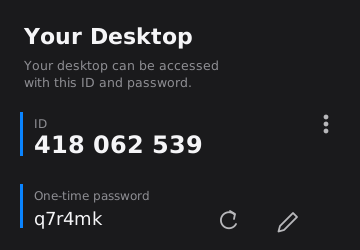
  6. Read me your ID and one-time password — both are at the top-left of the main screen. I'll use them to connect; that's the last thing you do. (I can switch on hands-off access while I'm in, so you won't have to read them out every time.) RustDesk's main panel showing your ID (with a menu-dots button on its right) and a one-time password
Comfortable on Windows and want zero steps? The optional automatic Windows setup does all of the above and just shows you an ID + password to read me. Heads up: Windows will likely warn (“Windows protected your PC” → More info → Run anyway), and some PCs or antivirus block it outright — that's why it's an extra option, not the main one.

Cameron Munroe

Cameron Munroe

IT Systems Analyst

Find Me Online

  • GitLab
  • GitHub
  • Buy Me a Coffee

Commits

Last 13 weeks

MTWTFSS2026-04-20: 40 commits2026-04-21: 79 commits2026-04-22: 117 commits2026-04-23: 56 commits2026-04-24: 92 commits2026-04-25: 60 commits2026-04-26: 78 commits2026-04-27: 48 commits2026-04-28: 45 commits2026-04-29: 11 commits2026-04-30: 138 commits2026-05-01: 49 commits2026-05-02: 34 commits2026-05-03: 31 commits2026-05-04: 47 commits2026-05-05: 23 commits2026-05-06: 35 commits2026-05-07: 37 commits2026-05-08: 41 commits2026-05-09: 73 commits2026-05-10: 20 commits2026-05-11: 64 commits2026-05-12: 77 commits2026-05-13: 41 commits2026-05-14: 35 commits2026-05-15: 15 commits2026-05-16: 23 commits2026-05-17: 20 commits2026-05-18: 47 commits2026-05-19: 102 commits2026-05-20: 42 commits2026-05-21: 33 commits2026-05-22: 81 commits2026-05-23: 89 commits2026-05-24: 85 commits2026-05-25: 40 commits2026-05-26: 12 commits2026-05-27: 5 commits2026-05-28: 3 commits2026-05-29: 40 commits2026-05-30: 54 commits2026-05-31: 24 commits2026-06-01: 2 commits2026-06-02: 23 commits2026-06-03: 39 commits2026-06-04: 64 commits2026-06-05: 83 commits2026-06-06: 50 commits2026-06-07: 44 commits2026-06-08: 29 commits2026-06-09: 25 commits2026-06-10: 4 commits2026-06-11: 2 commits2026-06-12: 42 commits2026-06-13: 83 commits2026-06-14: 15 commits2026-06-15: 23 commits2026-06-16: 14 commits2026-06-17: 39 commits2026-06-18: 16 commits2026-06-19: 31 commits2026-06-20: 31 commits2026-06-21: 21 commits2026-06-22: 23 commits2026-06-23: 14 commits2026-06-24: 9 commits2026-06-25: 25 commits2026-06-26: 47 commits2026-06-27: 58 commits2026-06-28: 8 commits2026-06-29: 50 commits2026-06-30: 13 commits2026-07-01: 13 commits2026-07-02: 47 commits2026-07-03: 186 commits2026-07-04: 83 commits2026-07-05: 15 commits2026-07-06: 67 commits2026-07-07: 86 commits2026-07-08: 29 commits2026-07-09: 33 commits2026-07-10: 21 commits2026-07-11: 32 commits2026-07-12: 66 commits2026-07-13: 91 commits2026-07-14: 56 commits2026-07-15: 17 commits2026-07-16: 26 commits2026-07-17: 34 commits2026-07-18: 7 commits

Available For

  • Network architecture & design
  • Firewall configuration
  • Server administration
  • Infrastructure consulting
  • Web development
  • K3s / Kubernetes deployments
Cameron Munroe · Blog · PKB · Portfolio · GitLab · RSS